

Entity Scavenger
Extracting files...
Entity Scavenger
Continue Playing
Play Entity Scavenger Free Online
Start Entity Scavenger
Choose New Game for a solo run or Multiplayer to open the lobby. Hold E to search a container, and return to the workbench to upgrade your crowbar.
Play Entity Scavenger Free Online
Entity Scavenger sends you into dark corridors to collect materials, build stronger crowbars, and find a way out. Choose NEW GAME for your first solo run, CONTINUE for a saved solo run, or MULTIPLAYER to open the online lobby. Put on headphones before you leave the workbench room. Hearing trouble while your eyes are on a cabinet is what makes Entity Scavenger scary.
Entity Scavenger Controls and Crowbar Upgrades
On a keyboard, use WASD to move, the mouse to look, E to interact, and Left Shift to sprint. Aim at a container and hold E while the search bar fills. Look for the item notification and check your three inventory slots before searching another cabinet.
- Leave the workbench room through the elevator and start on Level 1. Search basic filing cabinets for Rusted Metal.
- Bring the scraps back and use E at the workbench to open CRAFTING. Click the material icon to feed in pieces. You need four in total to make the Rusty Crowbar, so plan on more than one trip with three inventory slots. Watch the count fall and the crowbar shown in your hand change.
- Read the container's message if it won't open. It names the crowbar you need. Return with that tool after your next upgrade.
- Use the elevator to move between levels and return to the bench. Keep track of the way back as you search, especially when a room has several doors.
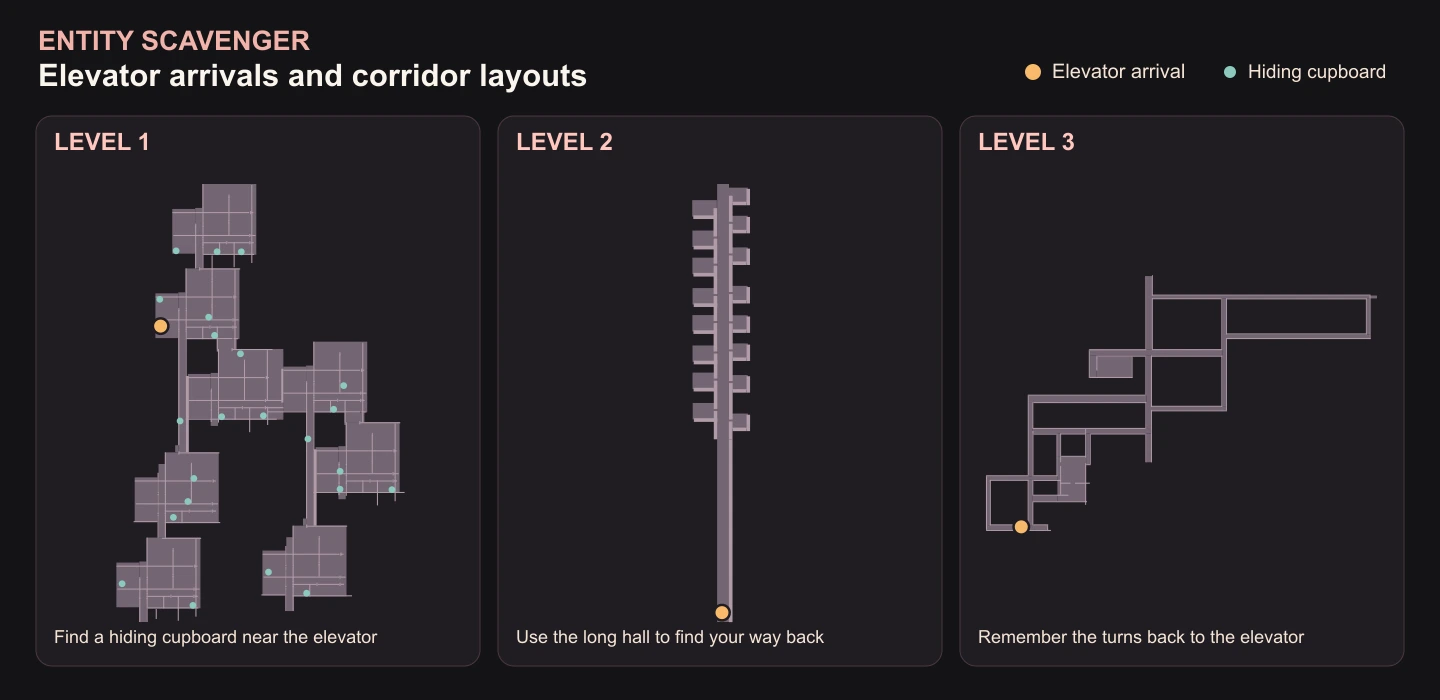
Entity Scavenger Route Through the Three Levels
| Where you are | What to do |
|---|---|
| Workbench room | Use it as your return point. Check the material and tool shown in CRAFTING before the next trip. |
| Level 1 | Find a nearby hiding spot before you commit to a long search. Start with cabinets you can pry open. |
| Level 2 | Match better containers to your current crowbar. A death on Level 1 or 2 resets progress toward the current material requirement. |
| Level 3 | Remember the elevator route. The enemy here returns to its spawn when you leave the level. Walk when you can. The Level 3 enemy moves faster while you sprint. If it catches you, your current crafting requirement goes up by two. |
In Entity Scavenger, cupboards give you a place to hide. Find one before you hold E at a locker, so you have somewhere to go when you hear movement. Once the workbench tells you to Escape!, follow the escape route and look for the code panel.
Is Entity Scavenger Your Kind of Horror?
Pick Entity Scavenger if you enjoy first person survival horror built around repeated supply runs. The pressure comes from staying in one place long enough to pry a container open while something can close in. Play solo to learn the elevator and hiding spots at your pace. In multiplayer, agree where to meet again before you split up to search.
Entity Scavenger FAQ
Read the tool name in the message. Bring the required crowbar back after upgrading at the workbench, and leave room in your inventory for what you find.
The final report in Entity Scavenger gives that designation to the place your temporary crew was sent to explore. Reach the exit if you want to discover what the employer knew about the assignment.